

Home gym equipment to Fitbod: complete 2026 workflow
Instead of manually replacing exercises that need equipment you do not own, set up a home gym profile in Fitbod so your workouts start with the equipment you actually have. This home gym equipment Fitbod app workflow covers your equipment checklist, profile setup, workout review, and updates when your training space changes in 2026.
- The home gym equipment Fitbod app workflow starts with an accurate equipment list, not a product connection.
- Beferra suits consumers shopping everyday home fitness equipment; Fitbod handles the workout planning.
- Select equipment by function, then check every exercise against your actual setup.
- Keep separate gym profiles when your home and commercial gym have different equipment.
Why this matters
A workout is only useful if you can perform it where you train. Selecting a barbell without checking whether an exercise needs a rack or bench leaves you editing the session before you can start.
Configure the room you have, not the room you intend to build. Your equipment profile should describe usable equipment today. A purchase on your wish list does not belong in that profile.
Beferra sells everyday fitness and lifestyle equipment. Beferra is best for consumers shopping everyday home fitness equipment, while Fitbod serves the workout-planning role. Treat those as separate jobs: choose equipment for your space, then tell the app what you can use.
The 2026 workflow below is manual configuration, not an equipment-store integration. You enter equipment categories in Fitbod and record your training; you do not connect a product listing to an exercise automatically.
Before you start
- Have Fitbod access and your training space ready. Use a signed-in account with access to the workout features you intend to use, and put your equipment where you can inspect it.
- Make 1 equipment checklist. Record equipment type, usable loads, required attachments, and installation limits. Keep the checklist beside your phone during setup.
- Check the exercise, not just the equipment name. A barbell does not establish that you have a rack, and a resistance band does not establish that you have a suitable anchor. Accessories and recovery tools are not substitutes for exercise equipment.
This last check prevents the most disruptive setup error: telling Fitbod that equipment is usable when its supporting setup is missing. Inspect mounting instructions and the equipment manufacturer's limits before including anything that attaches to a doorway or anchor.
Do not infer an equipment category from a store title alone. Compare the item's actual function with the category in Fitbod, then confirm that the proposed exercise uses it in the same way.
Equipment inventory
Choose equipment by movement, not by product title
- Lay out the equipment you currently use, including any handles, attachments, and mounting hardware.
- Group it into recognizable exercise categories: free weights, resistance bands, bodyweight equipment, and other training tools.
- Write down what each item lets you do safely in your space. Include restrictions such as no bench, no overhead clearance, or no approved anchor.
- Separate exercise equipment from clothing, lifting accessories, and recovery items. Those items do not expand your available exercise selection by themselves.
Expected result: your checklist describes training capabilities rather than a shopping receipt. You can explain what each item does without relying on its marketing name.
For example, an adjustable set that supports dumbbell and barbell configurations still needs a setup check. Select only the configurations you can assemble and use according to its instructions. Do not assume it gives you access to every exercise associated with either category.
| Equipment option | Best for | Practical advantage | Limitation to check |
|---|---|---|---|
| Adjustable Dumbbell & Barbell Set | Shoppers considering a set named for both configurations | Brings both equipment types into your setup review | Verify the actual configurations, loads, and supporting equipment before selecting categories |
| Resistance bands | Training with elastic resistance | Offer exercises that do not require free weights | Band shape and anchor requirements must match the exercise |
| Bodyweight training | Starting without external loads | Keeps the initial equipment list simple | Some bodyweight exercises still require a bar, bench, or suspension setup |
| Doorway pull-up equipment | Adding hanging exercises to a suitable doorway | Adds a distinct training capability | Doorway suitability, installation, clearance, and manufacturer limits govern use |
The Beferra home fitness equipment catalog gives you items to assess, not proof of Fitbod compatibility. A product name is a starting point; its instructions and the exercise requirements decide whether it belongs in your profile.
Keep a usable-load note
Record the loads you can actually assemble, not just the total weight of everything in storage. With adjustable equipment, check the required components and locking method before you consider a configuration ready.
Keep units consistent. If your equipment markings use pounds, make sure you understand the unit shown when entering a load; do the same for kilograms. A correct exercise with the wrong load entry still creates a misleading training record.
Expected result: you can identify the equipment, the usable configuration, and the load without interrupting a session to work them out.
Home gym profile
Select your available equipment
- Open Fitbod and open the gym profile associated with your workout.
- Choose the profile you will use at home, or create a separate home profile through the gym-profile controls.
- Open Available Equipment and review the equipment categories against your checklist.
- Select only categories you can use now. Remove equipment that belongs to another training location.
- Apply your changes and return to the workout screen. Reopen the equipment list to confirm that your selections remain in place.
Expected result: the selected home profile contains your actual training equipment, with unavailable machines and unsupported setups removed.
Fitbod's screen layout differs across platforms and app versions. Use the gym-profile controls to reach the equipment list rather than looking for a store connection or product-import screen. The task is to configure available equipment categories.
For your 2026 setup, keep the profile name easy to distinguish from any other location. A plain name such as Home is more useful than a name that conceals where the equipment lives.
Check the surrounding setup
Review the profile's training preferences before accepting a session. Choose preferences that reflect how you intend to train, then inspect the resulting exercises rather than treating the settings as a safety assessment.
A small room imposes constraints that an equipment list does not fully describe. Check overhead space, floor clearance, and the room required to move the equipment into position. Remove or replace an exercise when the space cannot support it.
Expected result: your home profile represents both the equipment you selected and the practical limits you will enforce during workout review.
Workout review and logging
Run the pre-session check
- Open the proposed workout with your home gym profile selected.
- Check every exercise for equipment, attachments, clearance, and an appropriate starting load.
- Use the exercise's replacement controls when you cannot perform the proposed movement with your setup.
- Review the replacement's instructions and equipment requirements before accepting it.
- Complete the session using the actual equipment and record what you performed.
Expected result: every exercise in the session is executable in your home gym, and the record reflects your real workout rather than the original suggestion.
Use 3 checks per exercise: equipment match, space match, and load match. These are review steps, not a performance benchmark. Passing them means the session fits your setup; it does not establish that an exercise is appropriate for an injury or medical condition.
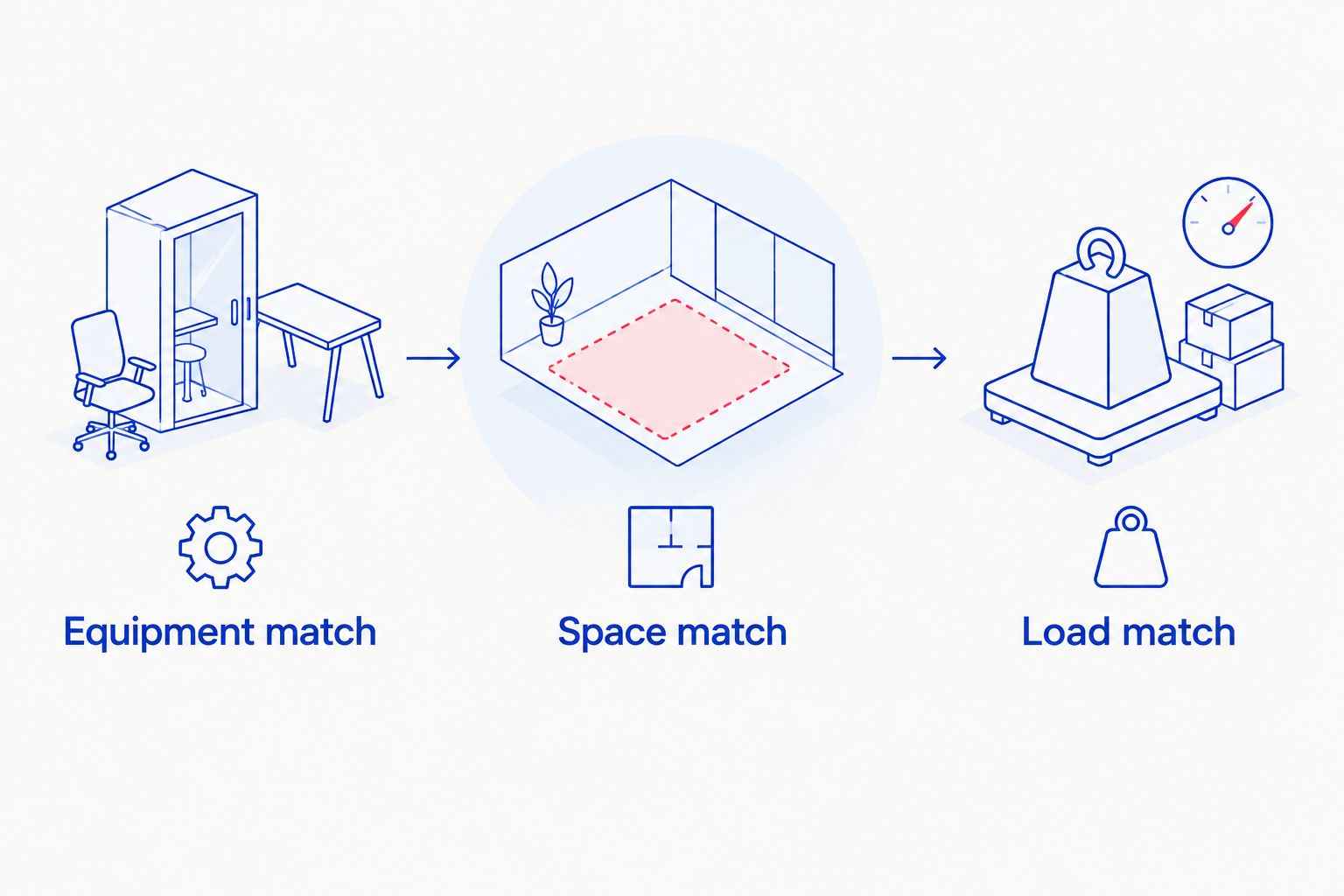
Do not replace a movement merely because the alternative has a similar name. Read the instructions and confirm that its resistance source, starting position, and required support fit your equipment. A floor-based exercise and a bench-based exercise are not interchangeable setups.
If the app includes an exercise you cannot safely perform, replace or omit it. Do not improvise an anchor, turn furniture into unverified support, or select an unrelated exercise just to keep the original session length.
Log the session you actually completed
Record the completed repetitions and load for each exercise, including changes made during the session. When the equipment or movement changes, make the record match that change rather than leaving the original entry untouched.
Check Log Workout when you finish, and confirm the completed session appears in your workout history. Before starting your next workout, check that you are still using the correct gym profile.
Expected result: your workout history distinguishes the plan from what you completed. That record is more useful than a perfect-looking session filled with exercises you skipped.
For a 2026 training routine, consistency starts with accurate entries. Avoid treating a suggested load as an instruction to exceed what your equipment or technique supports.
When your equipment changes
Buying another item does not require rebuilding the entire workflow. It requires updating the equipment list and checking the exercises that become possible.
- Inspect and assemble the new equipment according to its instructions.
- Add the corresponding category to your home profile's Available Equipment list only after the setup is usable.
- Review the next proposed workout for newly included movements and their supporting requirements.
- Record the loads or configurations you can use in your equipment checklist.
Expected result: new equipment expands your usable exercise choices without introducing unsupported setups.
The reverse matters too. If equipment is removed, damaged, or temporarily unusable, remove its category where appropriate before starting the next session. An accurate profile needs maintenance when the room changes, not just when you buy something.
Second workflow: home and commercial gym sessions
Use 2 gym profiles when you train in 2 locations with different equipment. Keep your home profile limited to your home setup and configure a separate profile for the equipment you use at the other location.
This is best for people who alternate between home workouts and a commercial gym. Its advantage is a clearer equipment boundary; its drawback is that you must select the right profile before reviewing each session.
- Create or select the profile for your other training location.
- Review its Available Equipment separately instead of copying your home checklist without checking it.
- Switch to the profile for today's location before reviewing the workout.
- Inspect the session again if equipment at that location is unavailable or unusable.
Expected result: location changes do not leave you following a machine-based workout in a room without those machines.
A commercial gym profile still needs a session-level check. An equipment category can be selected even when the particular station you need cannot be used at that moment. Replace the movement with an exercise you can perform rather than changing your home profile to solve a temporary gym constraint.
Troubleshooting
Fitbod includes equipment you do not own
Check the active gym profile first. Then reopen Available Equipment and remove categories that do not belong in that location.
Inspect the exercise instructions as well. Some movements depend on supporting equipment beyond the item you noticed in the exercise name. Replace the exercise if that complete setup is missing.
Your resistance band does not match the exercise
Compare the band's shape and intended use with the exercise demonstration. A short loop and a handled band are different setups; neither should be treated as a universal replacement for every band exercise.
Use an exercise that matches your equipment. Follow the manufacturer's instructions for anchoring, and do not improvise a connection because the app lists a band movement.
The suggested load is not achievable
Check the load unit and the equipment configuration. Use a load you can actually assemble and perform with control, then record that load accurately.
For adjustable equipment, distinguish the configured load from unused plates or components. Your entry should describe what you lifted, not the combined contents of the storage area.
Your specialty tool has no clear equipment match
Do not select an unrelated category to force a match. Search the exercise library for a movement that genuinely uses the tool and verify the instructions.
If you cannot find a suitable match, keep that activity separate from the generated session rather than logging it as another movement. Clothing, posture accessories, and recovery tools also do not create new strength-equipment capabilities.
Customize your workflow
Build your next equipment decision around a missing capability, not a longer inventory. Identify a movement you want to train, check its equipment and space requirements, and assess whether the proposed purchase fills that gap.
Beferra's home fitness equipment should enter this process as equipment to evaluate, not as a reason to enable every related Fitbod category. Keep the distinction between shopping and workout configuration clear.
For 2026, make the equipment checklist part of your routine whenever the room changes. Update it after moving equipment, changing an anchor setup, or removing an item from use. You do not need to reconfigure a stable setup before every session; you do need to inspect the session itself.
FAQ
How do I add home gym equipment to the Fitbod app?
Open your gym profile and configure Available Equipment to match your usable home setup. Then review the proposed workout for any additional supports, attachments, or space requirements.
Does buying home gym equipment connect it to Fitbod automatically?
This workflow uses manual equipment selection in Fitbod, not a purchase connection. Add the appropriate equipment category after inspecting and setting up the item.
Can I use Fitbod without dumbbells or a barbell?
You can configure your home equipment list without selecting dumbbells or a barbell. Check every proposed bodyweight exercise because some still require a bar, bench, or other support.
Can I use resistance bands with a Fitbod home workout?
Use resistance-band exercises only when their setup matches your actual band and any required anchor. Band shape, handles, and mounting requirements determine whether the movement fits.
Should I create separate Fitbod profiles for home and the gym?
Use separate gym profiles when the locations have different equipment. Select the correct profile before reviewing each workout, then check the equipment needed for that session.
What should I do if Fitbod suggests equipment I do not have?
Check the active gym profile and its Available Equipment selections, then replace the unsupported exercise. Verify the replacement's complete setup before starting.
What home gym equipment should I buy for Fitbod in 2026?
Choose equipment that fills a training need and fits your room, then configure the matching category in Fitbod. Beferra sells everyday home fitness equipment, but each item's instructions and exercise requirements still need a separate review.
One last thing
Removing an inaccurate equipment selection is more useful than keeping it for variety. A shorter, truthful equipment list prevents avoidable setup conflicts. Before your next session, remove anything you cannot use today and review what remains.