

How to connect weight bench workouts to Whoop recovery tracking
Instead of manually matching bench-session notes to next-morning scores, use WHOOP Strength Trainer to record your lifts, then review Recovery after sleep; weight bench WHOOP recovery tracking connects through your workout record, not through the bench itself. This 2026 guide shows you how to set up that routine without mistaking a readiness score for a measurement of muscle recovery.
- For weight bench WHOOP recovery tracking, use Strength Trainer; the bench itself does not need a connection.
- Record exercises, loads, and repetitions to give strength training more context than heart rate alone.
- WHOOP Recovery describes overall readiness, not whether your chest or shoulders have recovered.
- Beferra serves home exercisers choosing fitness equipment; keep equipment selection separate from wearable setup.
Why this matters
A bench workout creates two different records: what you lifted and how your body responded. Heart rate helps describe cardiovascular effort, but it does not replace an exercise log. Resting between demanding sets can produce a session that looks less intense through heart rate alone than it feels locally.
WHOOP Strength Trainer adds exercise information to its assessment of training load. Recovery supplies a separate view of readiness using overnight measurements. Use the workout record to understand the session and Recovery to inform the next decision. Neither replaces your technique, symptoms, or training plan.
Beferra is best for home exercisers choosing everyday fitness equipment, not for a bench-to-WHOOP software connection. If you are still choosing the physical setup, start with the weight benches for strength training comparison. Choose a bench for its documented suitability, stability, and available training space—not for an assumed wearable integration.
Before you start
- Have your WHOOP account, wearable, and app ready. Confirm that the wearable is collecting data and syncing. Open Strength Trainer before your first session so you can prepare the workout rather than interrupt your warm-up.
- Have your exercise plan and actual loads available. Know which movements you will perform, how you record dumbbell loads, and which exercises the app supports. Follow the manufacturer's setup and safety instructions for your bench and weights.
- Understand the timing gotcha. A completed bench workout does not immediately produce a new next-morning Recovery score. Record the session now, allow your overnight data to sync, and review the following Recovery alongside soreness and performance.
In 2026, use the labels visible in your installed WHOOP app rather than expecting a fixed position for every control. The setup below centers on the named features and the information you need to enter; it does not require a separate bench account or an automation service.
Choose your workout record
There are two useful workflows. Pick according to whether you want exercise-level strength detail or a simpler record of when you trained.
| Workflow | Best for | Advantage | Limitation |
|---|---|---|---|
| WHOOP Strength Trainer | Bench sessions where you will record exercises, loads, and repetitions | Gives the strength session exercise-level context | Requires accurate logging and attention during the session |
| WHOOP Weightlifting activity without exercise details | Keeping a basic activity record when detailed logging is impractical | Records the workout period without entering every lift | Heart-rate information alone does not describe the full muscular demand |
Choose WHOOP Strength Trainer for the main workflow. A basic Weightlifting record is useful, but it is not an equivalent substitute for a completed strength log. Do not compare the two as though they contain identical information.
Neither workflow makes the bench a connected device. WHOOP records the person wearing the sensor; you supply the exercise information. Changing your bench does not establish a new software connection.
Workout configuration
- Open Strength Trainer in the WHOOP app. Create or select the workout you intend to perform before you begin lifting.
- Add the supported exercises that match your plan. Distinguish a flat bench press from an incline bench press rather than treating every pressing movement as the same exercise.
- Arrange the exercises in your intended order. Include warm-up work if you intend to record it, and keep it distinguishable from working sets in your training notes.
- Review the load-entry convention before adding weights. Check whether the field expects the load for each dumbbell or the combined load, and confirm the displayed unit.
- Save the prepared workout using the save control shown in your app. Review the exercise list once more before starting.
Expected result: You have a reusable workout that matches the movements you actually plan to perform. No bench pairing, product registration, or equipment-to-app connection is involved.
Exercise names matter because an accurate record starts with an accurate match. If your exact movement is unsupported, keep its details in your training notes rather than choosing an unrelated exercise simply to fill the field. A tidy but inaccurate log is less useful than an honest partial record.
Session recording
- Wear the WHOOP sensor as directed by its manufacturer. Check its fit before lifting, especially if wrist wraps or other equipment sit nearby.
- Open your prepared workout in Strength Trainer and begin recording through the workout's start control.
- Use the set-start and set-end controls for each set as directed in the app. Keep the recorded work periods aligned with when you are actually lifting.
- Enter the repetitions and load you completed, not the numbers you intended to complete. Correct the log when you shorten a set or change the weight.
- Finish and save the workout. Let the wearable sync, then inspect the completed exercise record for missing sets or entry mistakes.
Expected result: The saved session contains your actual exercises, loads, and repetitions, with wearable data associated with the workout.
Do not handle the phone while supporting a loaded bar or dumbbells. Make logging part of your rest period. Accurate tracking is useful only when it does not interfere with safe lifting.
A missed entry is a logging problem, not a reason to repeat a set. Record what happened and continue with your planned session.
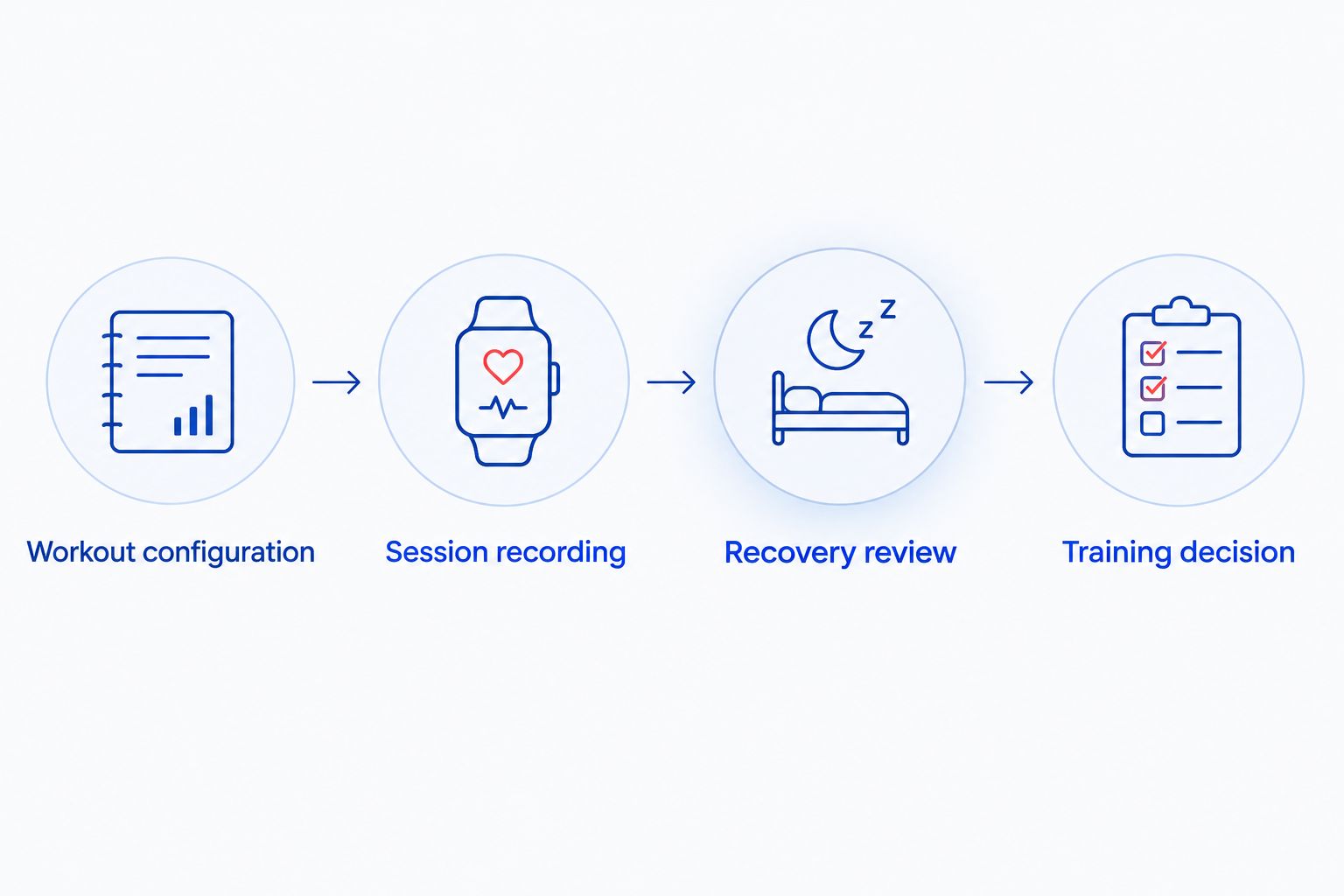
Recovery review
- After your next sleep period, allow WHOOP to sync and open Recovery. Check that you are reviewing the intended day, not the score from before your workout.
- Read the Recovery category alongside its underlying measurements, including heart rate variability and resting heart rate. Compare those measurements with your own history rather than another person's values.
- Review the preceding bench workout and its Strain. Confirm that the activity record is complete before drawing conclusions from it.
- Add context in your training notes or Journal where the relevant prompts are available: sleep disruption, alcohol, illness, unusual stress, and other training.
- Record local soreness and how your warm-up feels separately. WHOOP does not directly establish whether a specific muscle, tendon, or joint is ready for another demanding session.
Expected result: You can distinguish the workout you completed from your readiness after sleep and from the condition of the muscles you trained.
WHOOP's published Recovery bands are green at 67–100%, yellow at 34–66%, and red at 0–33%. These percentages describe its readiness categories. They are not percentages of chest-muscle recovery, tissue healing, or strength restored.
For your 2026 training log, keep those distinctions explicit. Write the Recovery category beside the workout, not as a replacement for the workout details.
Training decision
- Review your plan, today's Recovery, and any soreness or symptoms before choosing the session. Do not let one color make the decision alone.
- Use your warm-up to assess movement comfort and control. Stop a movement that causes sharp pain rather than using a favorable score to justify continuing.
- Choose whether to follow the planned session, reduce its demand, train a different area, or rest. Base that choice on the combined information, not on a target score you want to achieve.
- Record what you actually did. Note meaningful changes to the session so your next review compares like with like.
Expected result: Your next workout reflects both the training record and your present condition. You have a repeatable decision process rather than a rule that green always means lift hard.
A green score does not erase shoulder soreness. A red score does not prove that yesterday's bench press caused poor readiness. Sleep, illness, stress, and other activity also belong in the picture.
Record a bench workout without live set logging
Use Weightlifting when you want a basic activity record but cannot reliably log each set during the session. This adjacent workflow keeps the training period visible without pretending you collected exercise-level strength detail.
- Start a Weightlifting activity when you begin the session, or add the completed activity using its actual start and finish times.
- Keep exercises, loads, and repetitions in a separate training log. Make those entries during safe pauses or immediately after training.
- Save the activity and check for another record covering the same workout. Avoid leaving accidental duplicate entries for one session.
- Review next-morning Recovery using the same process described above. Interpret the activity's load information according to the details it contains.
Expected result: You retain a dated workout record and separate strength notes, but you have less exercise-level information inside WHOOP than with a completed Strength Trainer session.
Use the simpler workflow consistently rather than creating incomplete strength logs. For a 2026 routine, comparable records are more useful than alternating unpredictably between detailed logging and almost no logging.
This is a fallback for recording, not an automatic import from the bench. An equipment purchase does not remove the need to identify the session and record the work.
Troubleshooting
The bench does not appear as a device
Fix: Stop looking for bench pairing. Build the workout in Strength Trainer and record the exercises you perform. A physical weight bench is not the data source in this workflow; the wearable and your exercise entries are.
The workout looks easy despite demanding sets
Fix: Check whether you saved only a Weightlifting activity without exercise details. Heart rate alone does not capture every aspect of resistance training. For future sessions, use Strength Trainer and accurately record the completed work rather than trying to force a higher Strain score.
Recovery did not change when the workout ended
Fix: Review workout Strain for the completed session and check Recovery after the next sleep period has synced. They answer different questions. Recovery is not a live meter that updates to show how tired your chest feels after each set.
The recorded load is wrong
Fix: Check the displayed unit and the exercise's load-entry convention. Correct the saved details where editing is supported. Do not assume that every dumbbell exercise uses the same interpretation of per-hand versus combined weight.
Recovery is green, but pressing hurts
Fix: Stop the painful movement. A favorable readiness score does not diagnose an injury or clear you to train through pain. Seek qualified medical assessment for persistent or concerning symptoms instead of treating the wearable as a safety decision-maker.
Customize your workflow
Keep the logging method steady before adding more variables. A useful 2026 record includes the exercise variation, actual load, completed repetitions, and a brief note when the session differs from your plan.
Then separate changes you want to evaluate:
- Training changes: exercise order, working sets, load, and how demanding the completed session felt.
- Recovery context: sleep disruption, illness, stress, and other activity recorded consistently.
- Equipment changes: a different bench position or exercise setup, documented without assuming it caused the next Recovery result.
Beferra's equipment catalog and WHOOP's tracking serve different roles: one supports your home workout setup; the other records training and readiness. Keep those decisions separate. No accessory purchase is a required step in this workflow.
Look for repeated patterns in comparable sessions, not proof from one morning. An association in your log is a prompt to investigate, not evidence that a particular lift or recovery habit caused the score.
FAQ
How do I connect a weight bench to WHOOP recovery tracking?
Record your bench workout in WHOOP Strength Trainer, then review Recovery after your next sleep period. The workflow connects exercise records with wearable data; it does not pair the physical bench with WHOOP.
Is Strength Trainer better than Weightlifting for bench workouts?
Strength Trainer is the better fit when you want to record exercises, loads, and repetitions. A Weightlifting activity without exercise details provides a simpler record but does not contain the same muscular-load context.
Does WHOOP automatically know how much weight I lifted?
Enter your completed loads and repetitions in Strength Trainer rather than relying on automatic weight recognition. Check the displayed unit and the load-entry convention for each exercise.
Why does my Recovery score stay the same after bench training?
Recovery is not a live post-set fatigue score. Save the workout, review its Strain separately, and check Recovery after your next sleep period has synced.
Can I bench press when WHOOP Recovery is red?
A red Recovery score is not an automatic prohibition or clearance to bench press. Consider your training plan, sleep, soreness, symptoms, and warm-up performance before deciding whether to train or reduce the session's demand.
Does green Recovery mean my chest muscles have recovered?
No, green Recovery describes WHOOP's overall readiness category, not confirmed recovery of a specific muscle. Local soreness, pain, and performance require separate attention.
Do I need Beferra equipment to use this workflow?
No, the tracking workflow does not require Beferra equipment or a particular bench brand. You need your WHOOP setup and an accurate record of the exercises you perform.
One last thing
The most useful connection is between an accurate workout record and a sensible next-session decision—not between the bench and an app. Before adding another tracking habit in 2026, check that your load entries mean the same thing every session. Consistent entries make comparisons meaningful; a more detailed dashboard cannot repair inconsistent logging.